Instructions to enable Oracle SSO for your Sauron endpoints
Restrict access using OIM entitlements
When enabling SSO, you are required to restrict access to your Sauron endpoints using Oracle OIM entitlements.
NOTE:
- Your HTTP basic authentication credentials will still work after SSO is enabled for Sauron endpoints.
- If a user belongs to multiple OIM entitlements, higher privileged role takes precedence:
e.g. if a Grafana user belongs to both [Team]Editor and [Team]Viewer OIM entitlements, user will be assigned [Team]Editor role which is a more privileged role.
- Users in
[Team]AdminOIM entitlement will have full access to Sauron API endpoint. Users in[Team]ViewerOIM entitlement will have read-only access to Sauron API endpoint. They can only access GET APIs. Access to any other APIs (e.g. PUT/DELETE) will returnAccess Denied. - OIM permission changes will not be reflected until a user logs out and logs back in using SSO.
- Restricting SSO access using OIM entitlements is mandatory if you plan to enable SSO for all Sauron endpoints (Global SSO).
- Restricting SSO access using OIM entitlements is optional (although highly recommended) if you plan to enable SSO for only Grafana or OpenSearch Dashboards endpoints. IDCS implementation mandates having atleast one app specific OIM entitlement. This means even even though you decide to not create your own Sauron OIM entitlements to restrict Grafana or OpenSearch Dashboards access, you will still have to submit request to
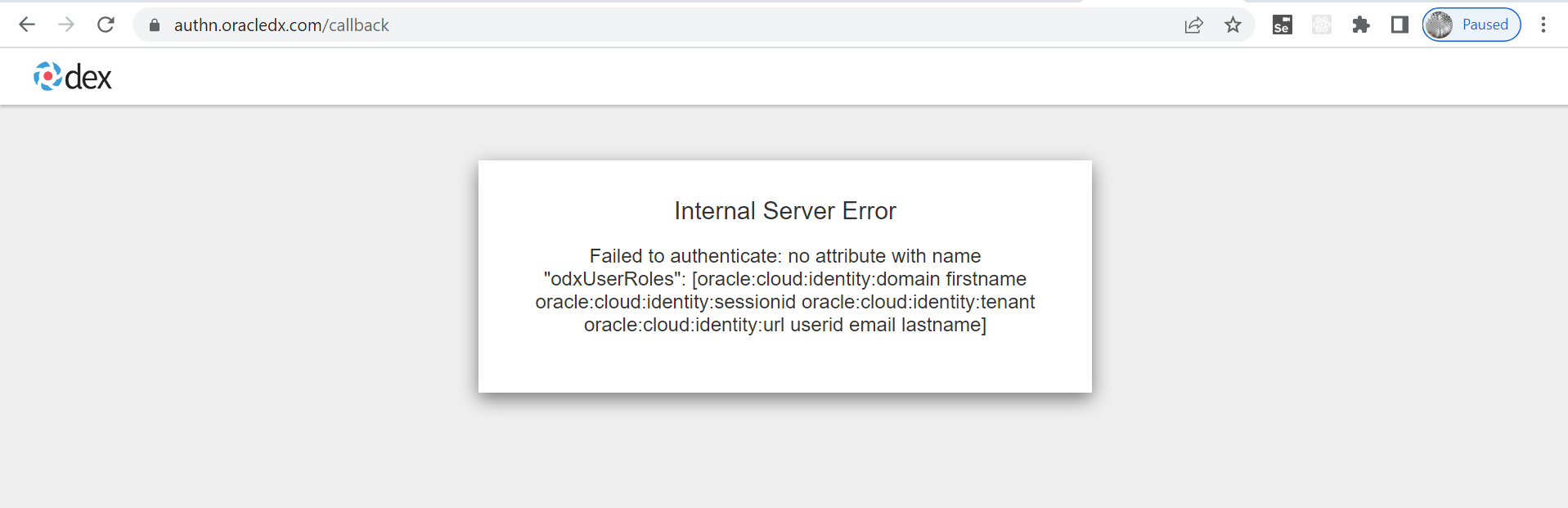
Hodor Ops Viewer IDCS ODX - Ops ConsoleOIM entitlement which will be auto-approved. After that you will be able to access your Sauron endpoints. - (Due to IDCS restriction) if a user tries to access a Sauron and he is not part of any Sauron OIM entitlement, Sauron will throw following error in browser:
Enable SSO
You have following options:
- Enable SSO for Grafana
- Enable SSO for OpenSearch Dashboards
- Enable SSO for all UI endpoints (Global SSO)
Enable SSO for Grafana
Steps:
- Create OIM entitlements (follow steps here).
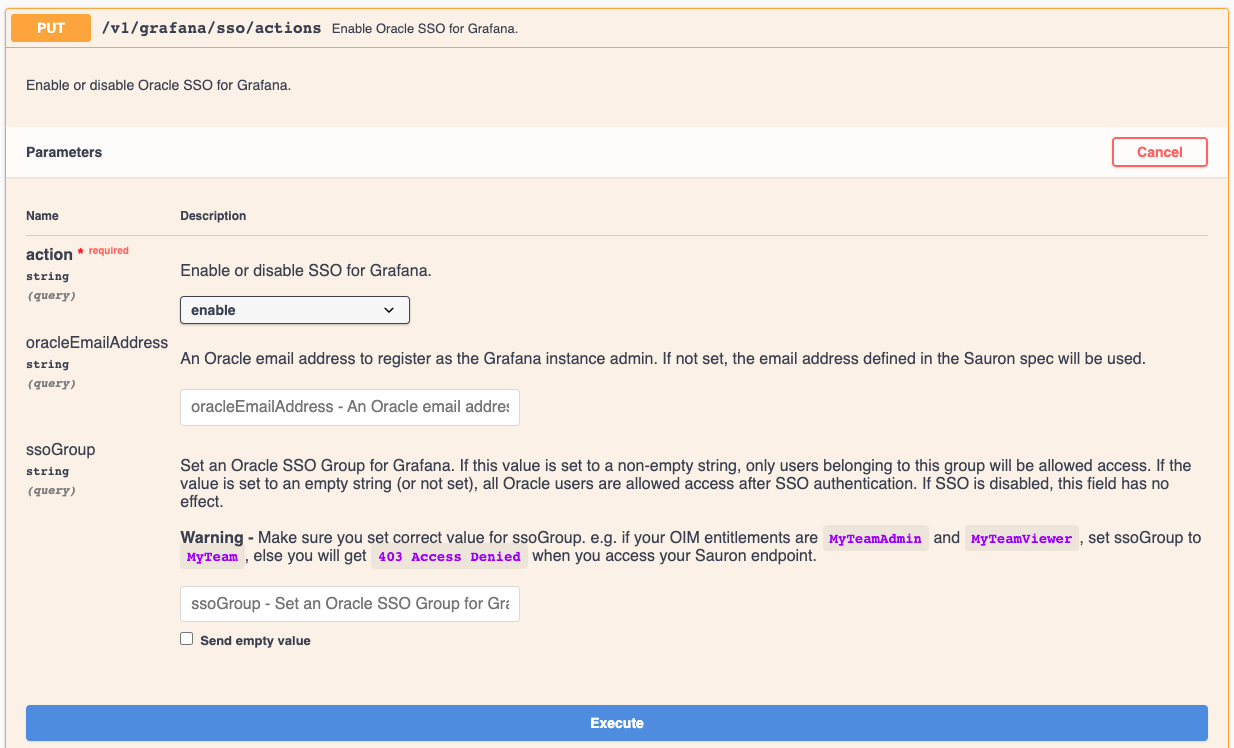
- Go to PUT /v1/grafana/sso/actions API, click
Try it Outand selectenablein dropdown. - Enter your Oracle email address for
oracleEmailAddressparameter. This user will have full admin access to Grafana endpoint. - If you created OIM entitlements to restrict access to your Grafana endpoint, enter value for
ssoGroup, else keep it empty.
e.g. for team MyTeam, ssoGroup should be set to MyTeam assuming you created following OIM entitlements:
* `MyTeamAdmin` for admin users
* `MyTeamViewer` for read-only users
* `MyTeamEditor` for users who can only edit dashboards (Grafana 8.x and above only)
WARNING : If ssoGroup is set to empty, all Oracle users will have Viewer access to your Grafana endpoint.
-
Click
Execute. You should get status code200. -
Wait for 2-3 minutes for Grafana pod to restart. Hit Your Grafana endpoint in a new browser window. It should now prompt for Oracle SSO credentials (instead of HTTP basic authentication). You may need to restart your browser or delete browser cache.
Setup multiple Grafana Administrators:
Grafana 7.x only:
We currently support RBAC for Grafana 7.x using what is provided out of box. (Grafana 7.x does not support passing roles as auth proxy headers in their OSS version. See this issue.)
For this reason, by default only one admin created on Sauron instance account has admin access to Grafana 7.x endpoint by default.
To add more admins, for each additional user you want to make a Grafana 7.x Administrator, follow this extra step:
- Add user to
MyTeamAdminentitlement using OIM. - Follow above steps to Enable SSO for Grafana and provide each user's email address for
oracleEmailAddressparameter. - Make sure you provide correct
ssoGroupvalue every time you call PUT /v1/grafana/sso/actions API. You can check current value of ssoGroup for your Sauron with GET /v1/sso/status API. Check ssoGroup value assigned for Grafana and use it forssoGroupparameter.
WARNING : If ssoGroup is set to empty, all Oracle users will have Viewer access to your Grafana endpoint.
Grafana 8.x and above :
For Grafana 8.x and above, we support all three Grafana roles - Admin/Editor/Viewer out of the box. We automatically map MyTeamAdmin/MyTeamEditor/MyTeamViewer OIM entitlements to Admin/Editor/Viewer Grafana roles respectively - no extra manual step is needed.
Grafana API Token support
If you need to use Grafana API Tokens, It is mandatory to enable SSO on your Grafana endpoint. Please refer to Grafana SSO enablement section
Enable SSO for OpenSearch Dashboards
Steps:
- Create OIM entitlements (follow steps here).
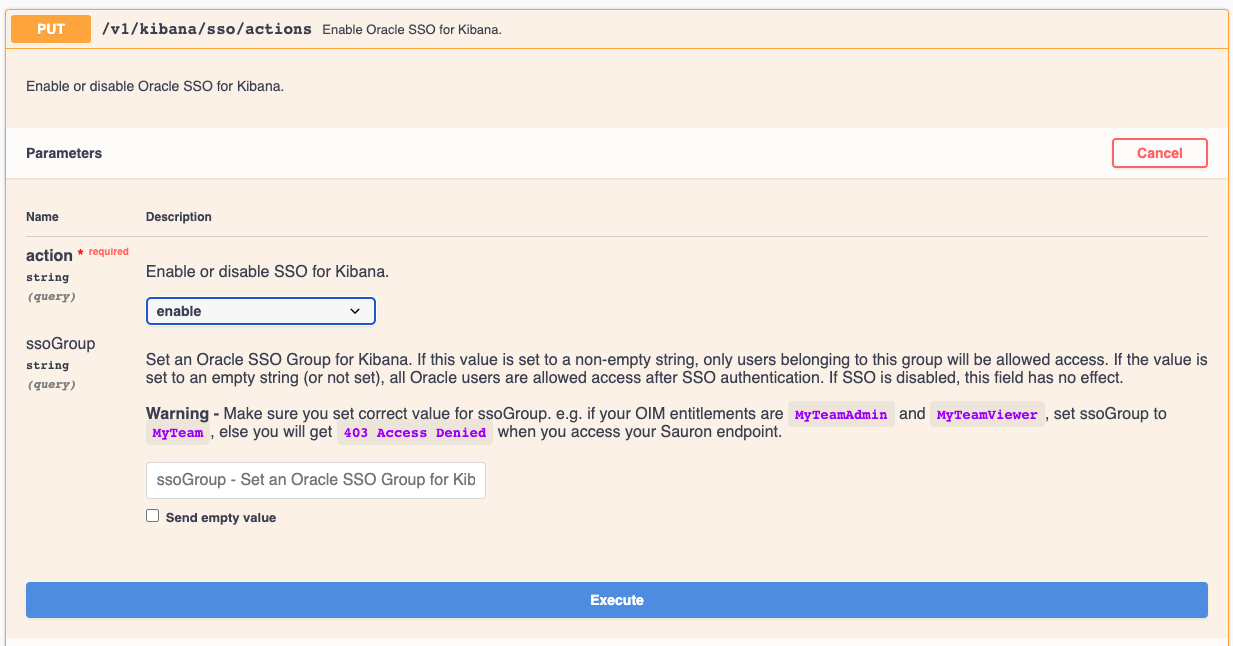
- Go to PUT /v1/kibana/sso/actions API, click
Try it Outand selectenablein dropdown. - (Optional) If you created OIM entitlements to restrict access to your OpenSearch Dashboards endpoint, enter value for
ssoGroup, else keep it empty.
e.g. for team MyTeam, ssoGroup should be set to MyTeam assuming you created 2 OIM entitlements:
* `MyTeamAdmin` for admin users
* `MyTeamViewer` for read-only users
WARNING : If ssoGroup is set to empty, all Oracle users will have full Admin access to your OpenSearch Dashboards endpoint.
-
Click
Execute. You should get status code200. -
Wait for 2-3 minutes for OpenSearch Dashboards pod to restart.
- Hit your OpenSearch Dashboards endpoint in a new browser window. It should now prompt for Oracle SSO credentials (instead of HTTP basic authentication). You may need to restart your browser or delete browser cache.
Enable SSO for all UI endpoints (Global SSO)
Global SSO will enabled SSO for following Sauron UI endpoints:
- Alertmanager
- API
- Console
- Grafana
- Help
- OpenSearch Dashboards
- Prometheus
- Thanos
- Thanos Rule
Steps:
- Create OIM entitlements (follow steps here).
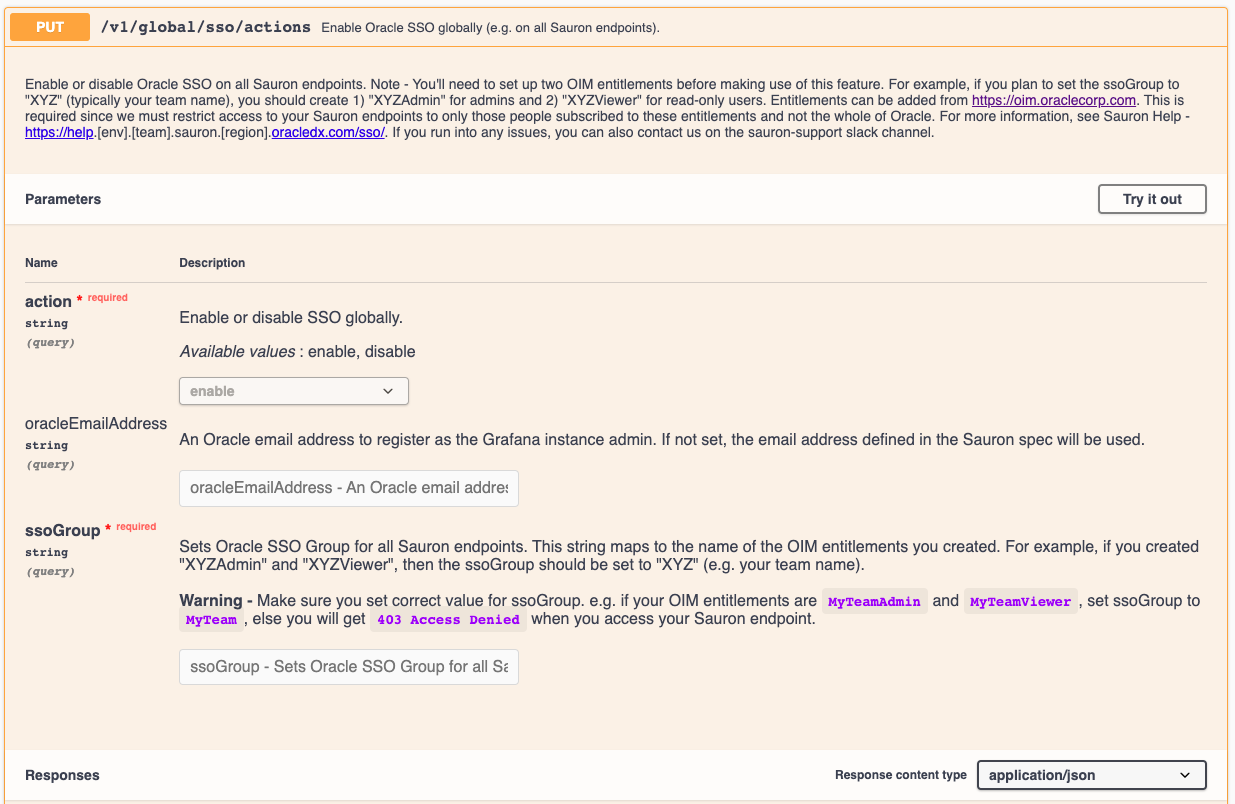
- Go to PUT /v1/global/sso/actions API, click
Try it Outand selectenablein dropdown. - Enter value for
ssoGroupe.g. for teamMyTeam,ssoGroupshould be set toMyTeamassuming you created 2 OIM entitlements:MyTeamAdminfor admin usersMyTeamViewerfor read-only users
- Click
Execute. You should get status code200. - Wait for 2-3 minutes for all Sauron pods to restart.
- Your Sauron endpoints (e.g. OpenSearch Dashboards) should now prompt for Oracle SSO credentials (instead of HTTP basic authentication). You may need to restart your browser or delete browser cache.
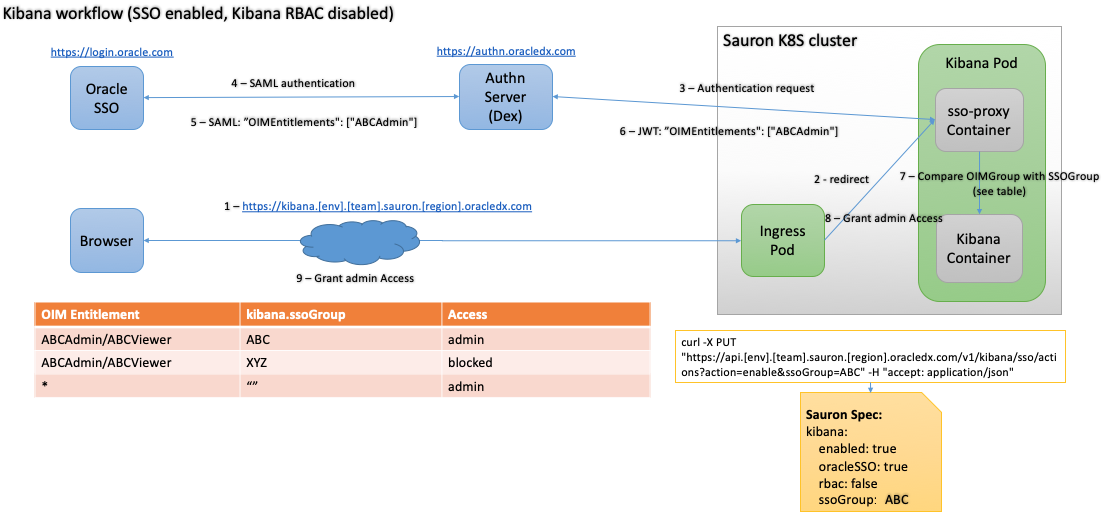
Architecture
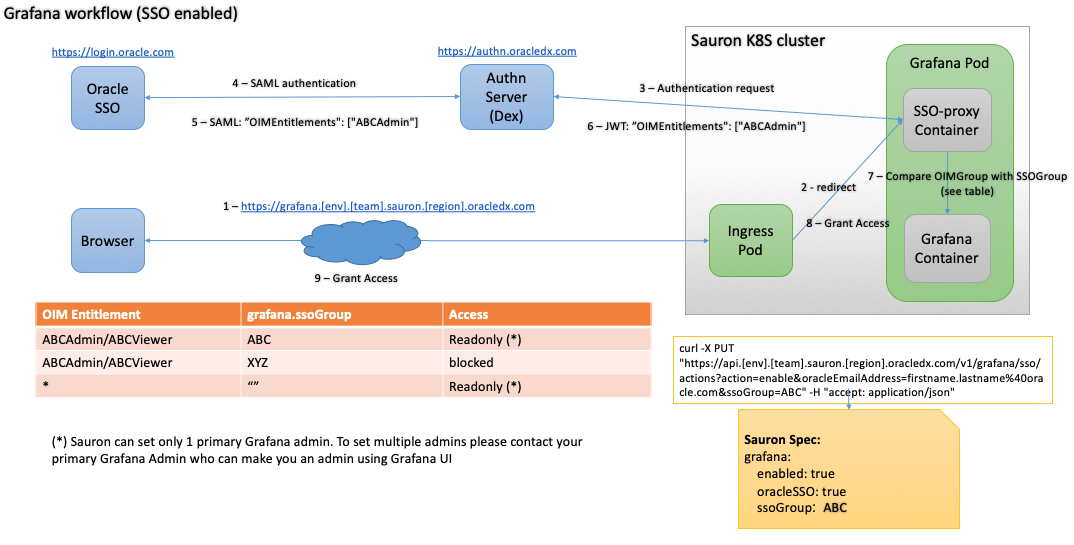
Grafana SSO Enabled
OpenSearch Dashboards SSO Enabled